Hi everyone.
I’m having a lot of fun with my Zmacs, it’s a great piece of gear!
I’m currently using it with 4 amps and 2 cabs.
I’ve just tried recording, using the direct amp 1-4 out straight to my audio interface with an IR loader in my daw. It sounds great when I’m using my cab at the same time, good signal and good sound.
But is it possible to have the same signal and sound without using a cab?
If I switch to cab 3 (not used) the signal is low and muffled (and maybe it’s not safe?).
Thanks for your help and gave a great weekend!
Hi @Matt6
Welcome to the forum!
For silent recording you really need to use the attenuator loop or put a reactive load on one of the cab outputs.
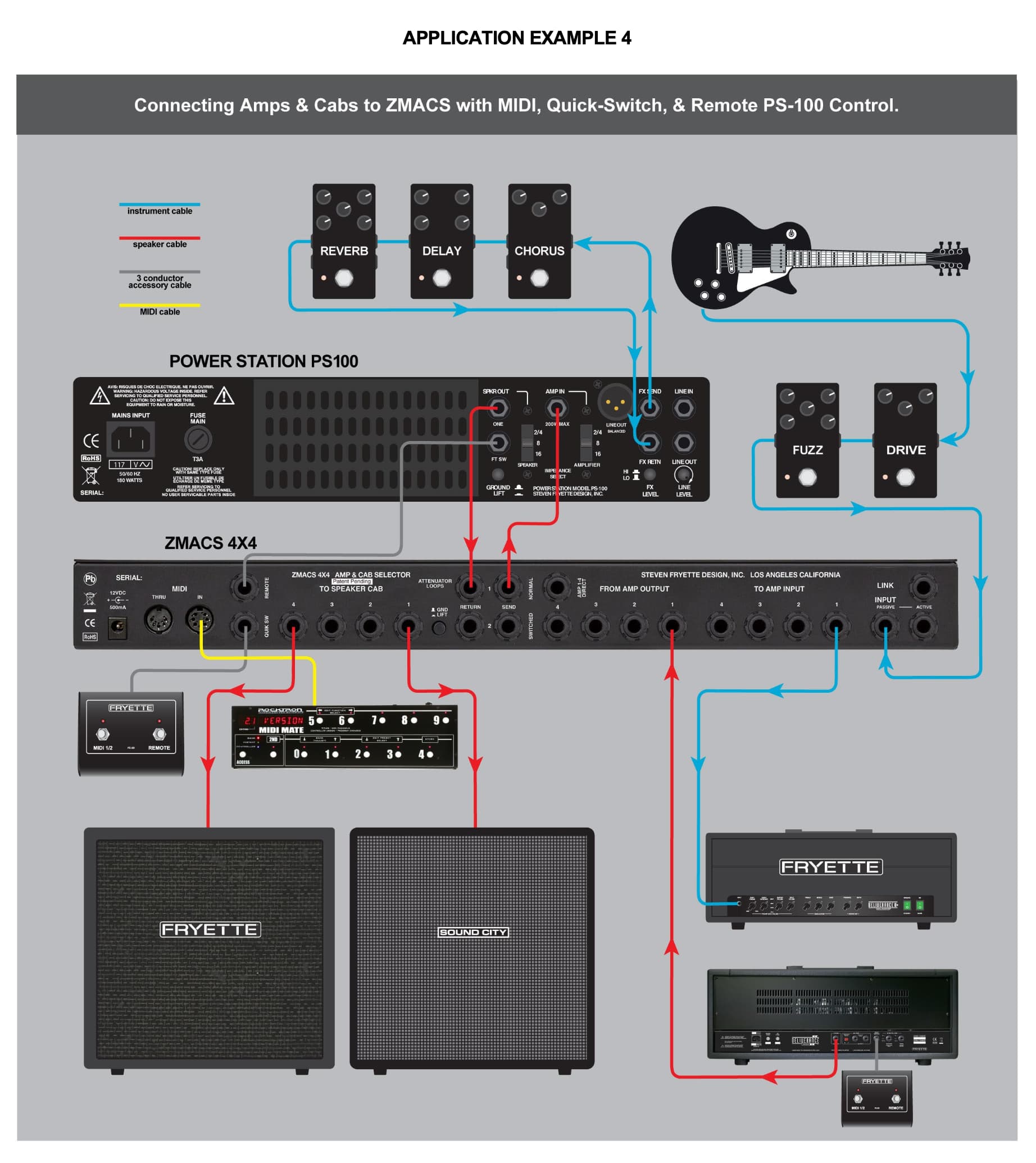
I’m not sure of your setup; if you want to explain exactly the connections, maybe with photos, that would help. But muffled sound is an indication something is not right!
Hi Dan,
Thanks for getting back to me, I’ll try to explain my set up.
It’s guitar → pedalboard → Zmacs in
I have 4 tube amps which are connected to the Zmacs, and 2 cabs.
Since yesterday, I have added a Two Notes Captor 16 to my setup, which is a reactive load. I’m using a speaker cable from the “to cab 3” output of the zmacs to the “speaker in” of the Two Notes Captor. The Captor is not connected to a cab. Zmacs cab 3 is set to 16 ohm.
Finally I use a TRS cable from the Zmacs “Amp dir” to my audio interface. I record the direct amp signal, and add an IR in my DAW.
This way, if I want to record my amp on my computer, I can:
- use cab 1 or 2 on the zmacs if I want to hear my real cab and record at the same time.
- use cab 3 on the zmacs (–> Two Notes Captor reactive load) and record the direct amp signal silently (no real cab in the room).
I have briefly tried this, and it seems to work fine (no muffled sound like yesterday)
Does that seem like a safe and logical setup to you? Do you see a better alternative (using the loop maybe)?
Thanks again for your help!
Cheers
Hi Matt,
Yes, it sounds safe and logical: based on the ZMACS settings, you are amp either seeing a cab or the load.
When you are ready, you could also experiment with moving the reactive load from Cab 3 into the attenuator loop. You would use ATTENUATOR LOOP SWITCHED because the Two Notes does not have a bypass. It’s all in the user manual.
Hoping I can jump in here too with an issue. I have the PS100 in the Normal attenuator loop on the Zmacs and I have the PLIR in the switched attenuator loop in my setup but I don’t get any signal to my DAW when doing so from the PLIR. I am not running a cab thru on the PLIR just the send from the Zmacs to the Amp in on the PLIR. From what I’ve read you are just supposed to push the Loop button on the front to engage it but I don’t get any signal. What am I doing wrong?
Hi @rcslikk and welcome to the forum!
In the switched attenuator loop, are you only connecting the send to the PL-IR and leaving the return jack unplugged?
Input → Amp Matrix → Normal Attenuator Loop (send/return) → Switched Attenuator Loop (send/return or bypass) → Speaker Matrix
I think you have two options:
1/ Connect the PL-IR THUR to the switched attenuator loop return. Your amp’s power will pass through the PL-IR unattenuated, but part of the signal will be tapped off and the outputs should activate.
2/ The PL-IR is a load not an attenuator. It’s best to use it like a silent speaker cab and connect it to one of the speaker jacks.
If this does not help, I need more information on your setup. Please most pictures of how everything is connected.
A big reason for my investing in the Zmacs was to be able to use it with the PLIR (even though it’s not an attenuator). I’m in a scenario where being able to record silent is a must. I found that by putting the PLIR in the switched attenuator loop that it was getting attenuated by the PS100. I had to crank all the inputs (PLIR, API preamp, SSL 18) to get any volume out of it which produced noise and it still wasn’t a good amount of volume. My solution was to try swapping loops and this seems to have solved my issue. My question would be is there any issue with running it this way? I don’t want to run the amp out of the PLIR because then it would defeat silent recording (as well as being ridiculously loud). In this scenario I just turn off the volume of the PS100. It still attenuates the cabinet volume if I have a speaker selected or I could select a cab that doesn’t have a speaker attached to it (on the Zmacs). I only have 2 speaker cabinets attached to the Zmacs. The caveat is having to have the PS100 on even when I just want to silent record but there’s no way not to have it on as the crank amps would be a huge problem.
I did try putting the PLIR in just as a cabinet but I did not get any sound out of it? What would be the proper way to connect it? I just tried via a speaker cable.
Hi @rcslikk
That makes sense, see that normal attenuator loop is before the switched one.
There is a problem with the diagram. The PLIR should be connected to ZMACS TO SPEAKER CAB jacks, we are going to treat it as a silent speaker. This will enable the PLIR outputs.
You could try moving the PS-100 to the switched loop and then disable it for the PLIR "speaker’ to keep the levels consistent.
The way I have it connected seems to work fine. Is there a problem with having it in the attenuator normal loop?
Is this what you’re referring to as far as how the connections should be made?
Finally, I’m not really understanding what the Loop button does on the front of the ZMACS. Right now the PS100 is in the switched loop but the Loop button doesn’t appear to do anything. I just get the PS100 whether the Loop LED is illuminated or not.
Yes this is how I would connect things.
LOOP turns on the switched loop and can be used manually or as part of a MIDI patch. Probably you want to save these as MIDI patches if you have a controller.
So you want that on for CAB outputs and off for PL-IR output because you want the PL-IR to see the full signal. Moreover, PS-100 is in the signal chain when hearing your cabs, and out of the signal chain when driving the PL-IR.


